A jewelry designer’s sketchbook is full of ideas that only truly come alive once metal catches light and gemstones throw color across a surface, something a flat pencil drawing can only hint at.
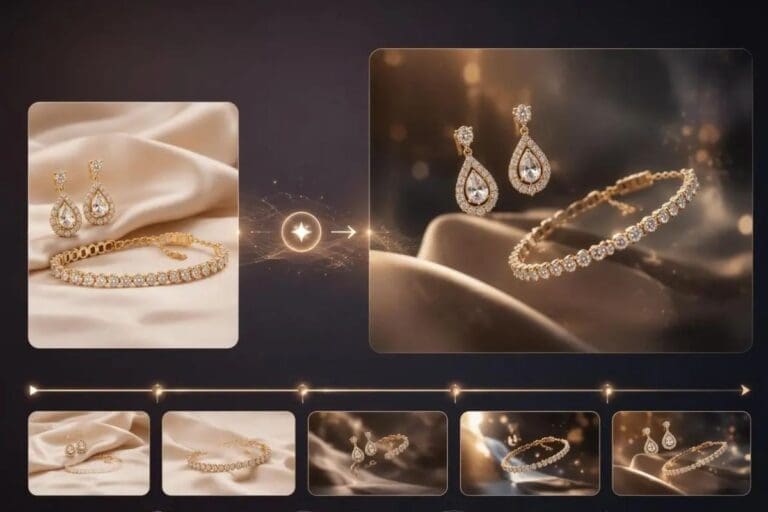
Image to video changes that completely, letting a sketch become an actual moving presentation that shows a piece the way it would genuinely look worn and lit.
Dreamina, powered by its advanced Seedance 2.5 video generation model, handles this kind of fine, luxury-detail animation with real precision. Here’s how to turn a design sketch into a presentation worth pitching.
Why motion matters so much for luxury design presentation
Jewelry and watches are defined by how they interact with light, a gemstone’s facets catching and scattering illumination, polished metal reflecting its surroundings, qualities that a static sketch simply cannot convey.
Motion reveals this interaction directly, giving stakeholders a genuine sense of the finished piece’s real presence.
Choosing a sketch with clear enough detail to animate
The strongest candidates for this technique already include enough technical clarity to guide the transformation:
- Clean, well-defined linework showing the piece’s actual structure
- Clear indication of material, metal type, gemstone placement
- A composition showing the piece from a flattering, informative angle
- Enough contrast for the model to distinguish separate design elements
Describing how light should move across the finished piece
Since the whole point is revealing how materials behave, describing specific light movement, a rotating gleam across polished gold, a sparkle catching a diamond’s facets, gives the animation genuine purpose beyond simple rotation.
How Seedance 2.5 supports this level of fine detail
Seedance 2.5’s precise local editing capability proves especially valuable for jewelry and watch presentation specifically, since it allows targeting exactly how light interacts with a gemstone or metal surface without distorting the surrounding design elements.
Its improved cross-cut consistency also matters when presenting a piece from multiple connected angles, keeping proportions and detail accurate throughout the full rotation rather than drifting between frames.
Your 3-step design reveal with Dreamina
Step 1: Upload reference image and write corresponding prompt
Visit Dreamina, sign in, and head to the AI Video section. Click “Add reference image” to upload your design sketch, then write a prompt describing how the piece should transform into a lit, dimensional presentation.
A strong 30-second sample prompt might read: Reference the watch’s engraved detailing, case shape, and sapphire crystal face from the uploaded sketch.
0-10 seconds: the sketch slowly transforms into a rendered gold watch, light beginning to catch its polished surface. 11-22 seconds: the watch rotates gently, light sweeping across the engraving and gemstone, revealing fine detail from multiple angles. 23-30 seconds: the watch settles into a final hero angle, light glinting softly off the crystal face.
Describing the sketch-to-render transformation alongside the lighting movement gives the animation a genuine presentational arc.

Step 2: Generate your video
After adding your image and prompt, choose the Seedance 2.5 model for generation.
Next, choose your video length, then a suitable aspect ratio: 16:9 suits a YouTube portfolio presentation, while 9:16 works well for Instagram Reels showcasing the design process. Finally, click Dreamina’s icon and wait a few seconds for processing.

Step 3: Enhance & export the video
Polish your clip before saving it using Dreamina’s AI editing tools. Use advanced tools like Upscale for crisp, high-resolution detail that shows off fine engraving and gem clarity, or Generate soundtrack to add a refined, elegant musical backing suited to luxury presentation. Finally, export and share it with clients or across your design portfolio.

Presenting the sketch-to-render transformation as the story
Rather than skipping straight to a fully rendered piece, keeping the initial sketch-to-dimensional transformation visible within the video tells a genuinely compelling design story, showing viewers the creative journey from concept to realized object.
Building a full collection presentation from multiple sketches
Once individual pieces animate well, sequencing several designs together, a ring, a necklace, a watch, sharing a consistent lighting style and presentation pacing, creates a genuinely cohesive collection reveal rather than isolated individual clips.
Matching presentation pacing to the piece’s complexity
A simple, minimalist design benefits from quicker, more confident motion, while an intricate, detail-heavy piece deserves a slower reveal that gives viewers real time to appreciate each element as it catches light.

Where animated jewelry presentations earn real business value
This kind of luxury-focused motion content serves several practical purposes:
- Independent jewelry designer client pitches and portfolios
- Custom commission presentations for private clients
- Brand marketing content for watch and jewelry launches
- Design school and portfolio presentation projects
Final thoughts
A jewelry or watch design’s true character only fully emerges once light and dimension enter the picture, and image to video makes that leap from flat sketch to genuine presentation achievable without a physical prototype.
With Dreamina and its advanced Seedance 2.5 video generation model, a pencil drawing can reveal exactly how a finished piece would gleam and catch light.
Sketch with real material clarity, describe how light should move, and let Dreamina help your design finally shine the way you imagined it.